Interactive construction drawings Your drawings, live and in colour.
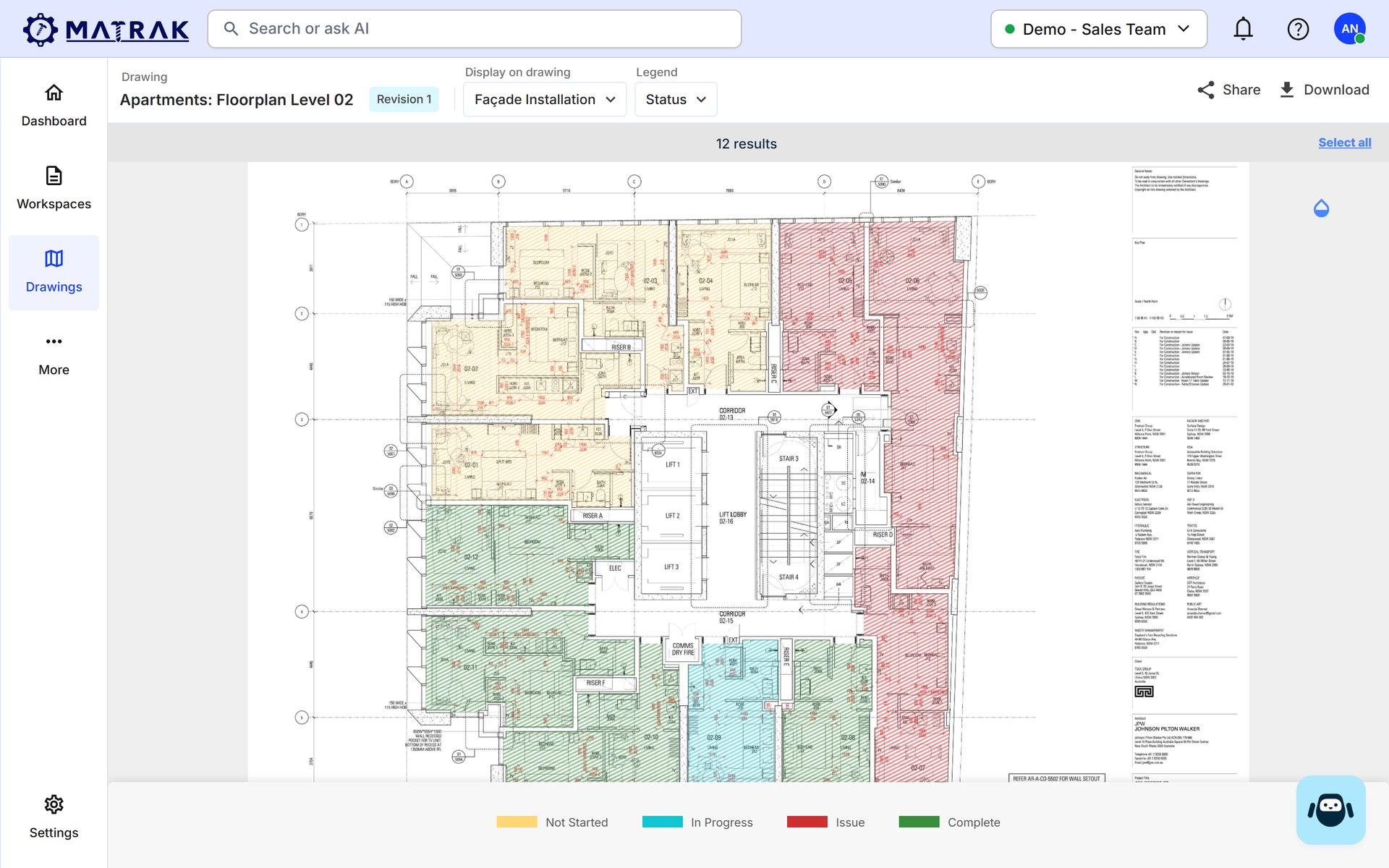
Interactive construction drawings: status, progress and photos on the drawing everyone already reads. Always the latest revision, on any phone, tablet or desktop.
Work completed, where materials go and which trade is next, shown on the drawing instead of described in an email.
PDFs + markupsMatrak
closeMarked-up PDFs emailed aroundcheckOne live drawing everyone works off
close“Which revision is current?”checkAlways the latest, synced automatically
closePhotos lost in a phone gallerycheckPhotos and documents on the item, on the plan
Level 07 · east elevationOn site
radio_button_uncheckedEL07-01 marked installed, with a photoInstaller · on site
radio_button_uncheckedIt colours in on the drawingAutomatic
radio_button_uncheckedSees Level 07 progress, no site walkProject manager
radio_button_uncheckedSees work completed, no update meetingClient
radio_button_uncheckedKnows the area is readyNext trade
task_altEveryone told on the drawing, with hours saved.
Who it's for
A good build needs the right tools.
Made for site coordinators, installers and project managers, and everyone who needs to see where the job is.
apartmentGeneral contractorsSee the whole job visually, to schedule trades and manage the schedule.
storefrontSuppliersSee what's made it to site and what needs calling up next.
constructionInstallersSee what needs doing, update quality checks and share progress.
event_availableProject managersQuick, accurate oversight from the latest drawings and revisions.
Anytime, anywhere
The same drawings, even offline.
The same live drawings on the web and the phone, even with no signal.
wifi_offOffline modeView and edit the latest drawings with no network. Changes sync as soon as you have reception.The Level 1 floor plan on the phone, windows by status.
fact_checkChecks beside the planPass or fail each item against the drawing, and see the area light up as it's done.Waterproofing checks per window, beside the plan.
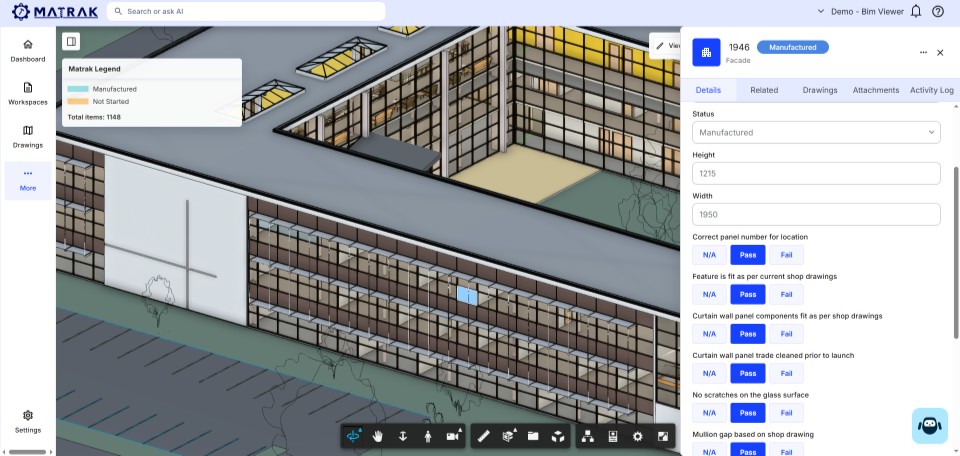
view_in_arBIM viewerStatuses and properties on the 3D model too, with the same legend as the drawings.The BIM viewer: status on the model, checks on the panel.
receipt_longBill of materialsGenerate a bill of materials from the drawings you upload.
historyEvery revision, managedAlways the latest drawings, with revisions synced automatically for everyone.
forumComments on the itemReferences and comments live on the item, so issues get fixed on the spot.
Your Matrak
Add Installation and what pairs with it.
Interactive drawings come with Installation. They come alive with the modules that colour them in.
constructionInstallersInstallation
Install progress logged on the drawing, with photos.
checkLive status on every drawing and item
checkInstall photos pinned to the plan
checkThe latest revision for everyone
checkWorks offline on site
Photoson every installProof of work that ends the blame game.
Pairs well with
grid_viewProgressEvery update on the drawing rolls into progress.
verifiedQualitySign-offs sit on the item on the plan, photos and all.
straightenAI TakeoffEvery item marked up on the drawings from day one.
info Add any. Build your Matrak to see your price.
In their words
Run from the drawings, in their words.
In over 10 years, Langston was one of the best projects we've ever run, and it's down to the use of Matrak. It was the saviour on this project, especially when we couldn't travel due to the pandemic. I would never run a project without Matrak for tracking facade.
JHJohn HennessyConstruction Manager, Hutchinson Builders + Lipman28 projects to date
FAQ
Interactive construction drawings: straight answers.
Anything not here? Ask Digi and someone from the team will reply by email.
Every item and area on the plan carries its live status, photos, documents and comments, and you update them straight from the drawing instead of a spreadsheet.
Yes. Everyone works off the latest drawings and revisions in one central place, and revisions sync automatically.
Yes. With offline mode you can view and edit the most recent documents with no connection. Changes sync as soon as your device has reception.
Yes. Upload your drawings, make them interactive and generate a bill of materials from them.
Site coordinators, installers and project managers day to day, plus general contractors and suppliers who need to see what's made it to site and what's next.
Yes. Start free and track up to 2,000 items on a real project with your own company, no card needed. Every module's page shows it on a sample project. You can also run an AI takeoff on your drawings from C$89 a trade, or book a demo and we'll walk you through Matrak on a job like yours.
Matrak is free for your own company, up to 2,000 items, with no card. A module adds the setup, the reports and the seats for one job, priced for one project or for every project (see Pricing). AI Takeoff is from C$89 a trade with no subscription. Build your Matrak to see your price.
format_color_fillMatrak · InstallationThu 2:20pmLevel 07 east elevation 100%Shared with the client. No update meeting.
Put the job on the drawing.
Start free with your own company, up to 2,000 items, or build your Matrak: pick your modules and see your price. Prefer a walkthrough? Book a demo.
 Horizon TowerA-301 East elevation · Rev CLive