Bluebeam's pricing pages listed four plans on 18 November 2026, each per user, billed yearly: Basics at US$260, Core at US$330, Complete at US$440 and Max at US$590. The Australian page listed the same plans at AU$451, AU$550, AU$737 and AU$979 a user a year, tax included. Max was marked as an introductory price. If what you want is the takeoff done for you, Matrak AI Takeoff is $89 a trade (AUD, plus GST) with no subscription. Measuring one project by hand can take over $2,000 of an estimator's labour. One Matrak AI takeoff is $89 a trade, so it can save over $2,000 of estimating labour on one project.
Below is what each plan lists, what pushes the bill up, and how Matrak AI Takeoff compares. Sources are at the bottom.
Bluebeam plans and prices
| Plan | Listed on the US pricing page | Listed on the Australian pricing page | What the page lists |
|---|---|---|---|
| Basics | US$260 a user a year | AU$451 a user a year | PDF creation, editing and markups, basic length and area measurement, join Studio sessions |
| Core | US$330 a user a year | AU$550 a user a year | Adds specialty markups for 2D and 3D PDFs, perimeters, counts, angles and volume, overlay and compare, hosting Studio sessions, CAD plug-ins |
| Complete | US$440 a user a year | AU$737 a user a year | Adds Dynamic Fill, Quantity Link to Excel, advanced markup reports, batch tools and scripting |
| Max | US$590 a user a year (introductory) | AU$979 a user a year (introductory) | Adds AI drawing reviews, AI drawing comparisons, AI multi-view stitching and Magic Markups |
Source: Bluebeam's US and Australian pricing pages, 18 November 2026. The Australian page marks its prices as tax inclusive. Every plan lists Revu for Windows, Bluebeam on web and mobile, phone and email support, training and storage. Bluebeam says you can mix plans across your users. Prices are what we found on public sources on the review date. They may be out of date or not apply to you. Do your own research and ask each vendor for a quote.
What drives the price
- Seats. Every person who needs it is a paid user. Ten users on Complete at the listed rates come to US$4,400 a year, or AU$7,370 on the Australian page (our sums from the listed prices).
- The plan your work needs. Counts and perimeters are listed from Core. Quantity Link to Excel is listed from Complete.
- AI features. The AI tools are listed in Max, and its price is marked introductory.
What to budget for beyond the seat
- The hours. Bluebeam's plans list measuring and markup tools that a person drives. The hours on each takeoff are the larger cost.
- Yearly billing. The pricing page lists yearly billing per user.
- Windows. The desktop app on the pricing page is Revu for Windows, alongside Bluebeam on web and mobile. Check what your Mac users will get.
Who Bluebeam is built for
Going by its pricing page, Bluebeam is built for teams who work in PDFs all day: marking up drawings, reviewing with consultants in Studio sessions, comparing revisions and measuring on the sheet. When the problem is the hours a takeoff takes, that is the job Matrak AI Takeoff does.
How Matrak compares with Bluebeam
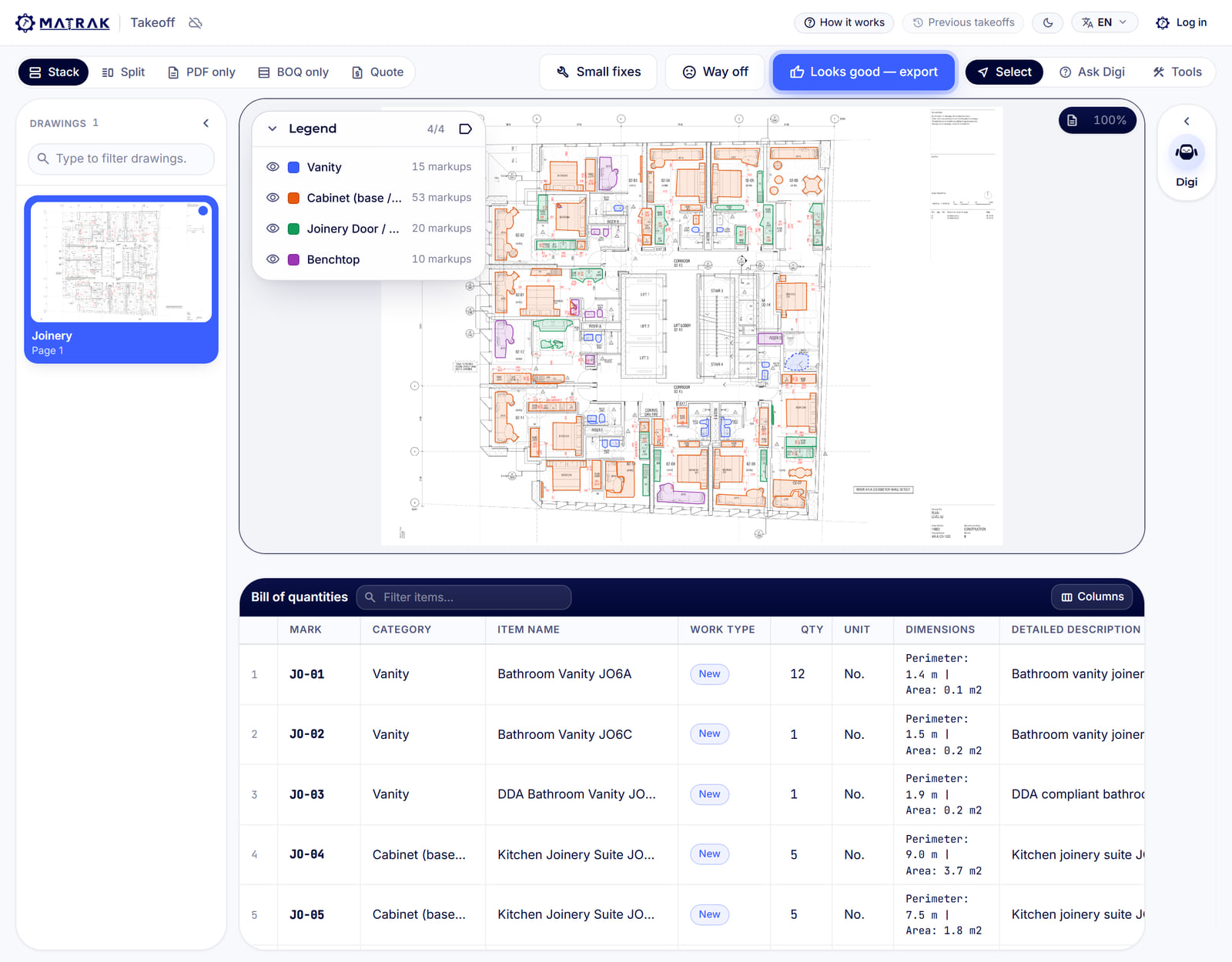
Bluebeam gives a person the tools to mark up and measure. Matrak AI Takeoff does the takeoff. Send the drawing set, name the trades, and the bill of quantities comes back with every item marked on the sheet it was counted from, for a person to check. Measuring one project by hand can take over $2,000 of an estimator's labour. One Matrak AI takeoff is $89 a trade, so it can save over $2,000 of estimating labour on one project.
- The AI does the first pass. It measures and counts the trade for you and a person checks it. You can still click and measure by hand when you want to.
- The whole project in one run. Over 1,000 documents go through in one pass, and the AI cross-references between drawings so the same item on a plan, an elevation and a schedule is counted once.
- Over 90 trades, with a full audit history. Every change is kept, whether the AI or a person made it.
- It fetches the drawings and runs itself. Matrak integrates with Procore, Aconex and Autodesk, so nothing is downloaded, and an AI agent can run the takeoff on a schedule as new drawings land, on approved versions only if you choose.
- Your format, your products. The bill and the quote come back as working Excel files in the format you use internally, with fully marked-up drawings, linked to your own product, price and parts lists.
- More than quantities. Embodied carbon assessment, variations management, claim assessment from drawings, construction schedule mapping and AI design management are baked in.
- Takeoff is only the start. The same bill drives supply chain, procurement, manufacturing, quality and progress, all from the same drawings.
What it costs. Matrak AI Takeoff is $89 a trade (AUD, plus GST), however many drawings go in together. There is no subscription and no seat fee. Monthly plans are $1,500 for 20 credits, $3,450 for 50 and $6,500 for 100, with extra credits at $65 each. The connections to Procore, Aconex and Autodesk, the scheduled tasks and Digi's access to your documents are free. You pay as you go only for the takeoffs and the other systems they run.
| Matrak AI Takeoff | Bluebeam | |
|---|---|---|
| Price | $89 a trade, AUD plus GST. No subscription | Complete US$440 and Max US$590 a user a year; AU$737 and AU$979 on the Australian page |
| Priced on | Trades run. No seats, no yearly commitment | Seats, billed yearly |
| AI does the first pass | Yes. The AI measures and counts the whole trade; a person checks | Max lists AI drawing reviews, AI drawing comparisons, AI multi-view stitching and AI integration via MCP |
| Whole project in one run | Over 1,000 documents in one pass | Not listed |
| Duplicates removed across drawings | Yes. Plan, elevation and schedule counted once | Not listed |
| Audit history | Every change, by the AI or a person | Not listed |
| Trades | A library of over 90 | Not listed |
| Procore, Aconex and Autodesk | All three. Drawings fetched with nothing to download | Procore, Newforma and Autodesk Forma |
| Runs itself when new drawings land | Yes, on a schedule, and on approved versions only if you choose | Not listed |
| Output | Bill and quote in your own Excel format, with fully marked-up drawings | Quantity Link to Excel in Complete; CSV or XML summary of markups |
| Carbon, variations, claims, schedule mapping, design management | All baked in | Not listed |
Matrak's column is what Matrak does. Bluebeam's column says only what its US pricing page said on 18 November 2026; "Not listed" means it was not listed there on that date. Prices are what we found on public sources on the review date. They may be out of date or not apply to you. Do your own research and ask each vendor for a quote.
If you need PDF markup and review across the firm
That is the job Bluebeam is built for, and many teams keep it for exactly that. Matrak runs alongside it: Matrak measures the project and hands back the bill, the quote and the marked-up drawings, and Bluebeam stays your review tool with consultants.
The two work side by side: Bluebeam for markup and review, Matrak for the takeoff. For the detail see Matrak AI Takeoff vs Bluebeam and all Matrak comparisons. Related reading: the best Bluebeam alternatives, the best AI takeoff software, and our guides to quantity takeoff and the bill of quantities.
Frequently asked questions
How much does Bluebeam cost?
On 18 November 2026 Bluebeam's US pricing page listed Basics at US$260, Core at US$330, Complete at US$440 and Max at US$590, each per user, billed yearly. The Australian page listed AU$451, AU$550, AU$737 and AU$979, tax included. Check the page for today's price.
Is there a monthly Bluebeam plan?
The pricing page lists every plan as per user, billed annually. It does not show a monthly price.
Which Bluebeam plan do I need for takeoff?
The pricing page lists counts, perimeters and volumes from Core, and Quantity Link to Excel and Dynamic Fill from Complete.
What is Bluebeam Max?
Max is Bluebeam's top plan. Its pricing page lists AI drawing reviews, AI drawing comparisons, AI multi-view stitching and Magic Markups on top of everything in Complete, at a price marked as introductory.
Does Bluebeam do automatic takeoff?
Bluebeam's pricing page lists measurement and markup tools, with AI review and comparison of drawings in Max. On 18 November 2026 it did not list a tool that produces a full bill of quantities for you. That is what Matrak AI Takeoff does.
Can I use Matrak with Bluebeam?
Yes. Matrak AI Takeoff measures the whole project and returns the bill of quantities in your own Excel format with marked-up drawings, at $89 a trade. Bluebeam stays your PDF markup and review tool. It can save over $2,000 of estimating labour on one project.
Sources
- Bluebeam pricing page (US): https://www.bluebeam.com/pricing/
- Bluebeam pricing page (Australia): https://www.bluebeam.com/au/pricing/
- Matrak price list: https://matrak.com/pricing/
Last reviewed 18 November 2026. Prices change; check the vendor's page before you buy.